 Image Type Saver
Save a WebP or AVIF image as PNG or JPG in Chrome
Short answer: Chrome saves the file the site sent, and many sites send WebP or AVIF. Renaming the file does not convert it. To get a real PNG or JPG you have to convert the image, either in an image editor or while you save it in Chrome.
It annoys a lot of people. One r/browsers user put it plainly: "if your image URL says it's a JPG, deliver me a JPG when I save it, not a webp, not an avif."
Why sites send WebP and AVIF
- Smaller files load faster. Google says WebP lossless images are 26% smaller than PNGs, and WebP lossy images are 25 to 34% smaller than comparable JPEGs. AVIF is a newer format that sites use for the same reason.
- The address can say .jpg and still deliver WebP or AVIF. Image services pick the format for each browser. Cloudflare's docs, for example, say its Polish feature serves the WebP version only when the browser's Accept header includes WebP, and its
format=autooption serves the most efficient format the browser supports. - Chrome asks for those formats. In our test, Chrome 148 listed
image/avifandimage/webpin its Accept header for an image on a page, and again when we opened that image in its own tab.
The free routes, and their catch
Rename the file to .png or .jpg
This changes the name, not the data. The file is still WebP or AVIF inside. Some apps open it anyway because they look at the data, but an upload form or an older app that expects a real JPG may reject it.
Open the image in a new tab, then save
Chrome asks for the same formats in the new tab, as our test above showed. A site that picks the format per browser will usually send WebP or AVIF again.
Take a screenshot
You get a PNG, but of your screen, not of the file. The image comes out at the size it was shown, which is often smaller than the real image, and anything outside the visible area is cut off.
Convert it in an image editor
Opening the file in an editor that reads WebP or AVIF and saving it as PNG or JPG is a real conversion. It takes a few steps for every image. Online converters work too, but many of them upload your image to their server.
Convert while you save, in Chrome
Image Type Saver is a Chrome extension that adds Save image as to the right-click menu, with PNG, JPG and WebP. Right-click the image, pick a format, and the file lands in your Downloads folder.
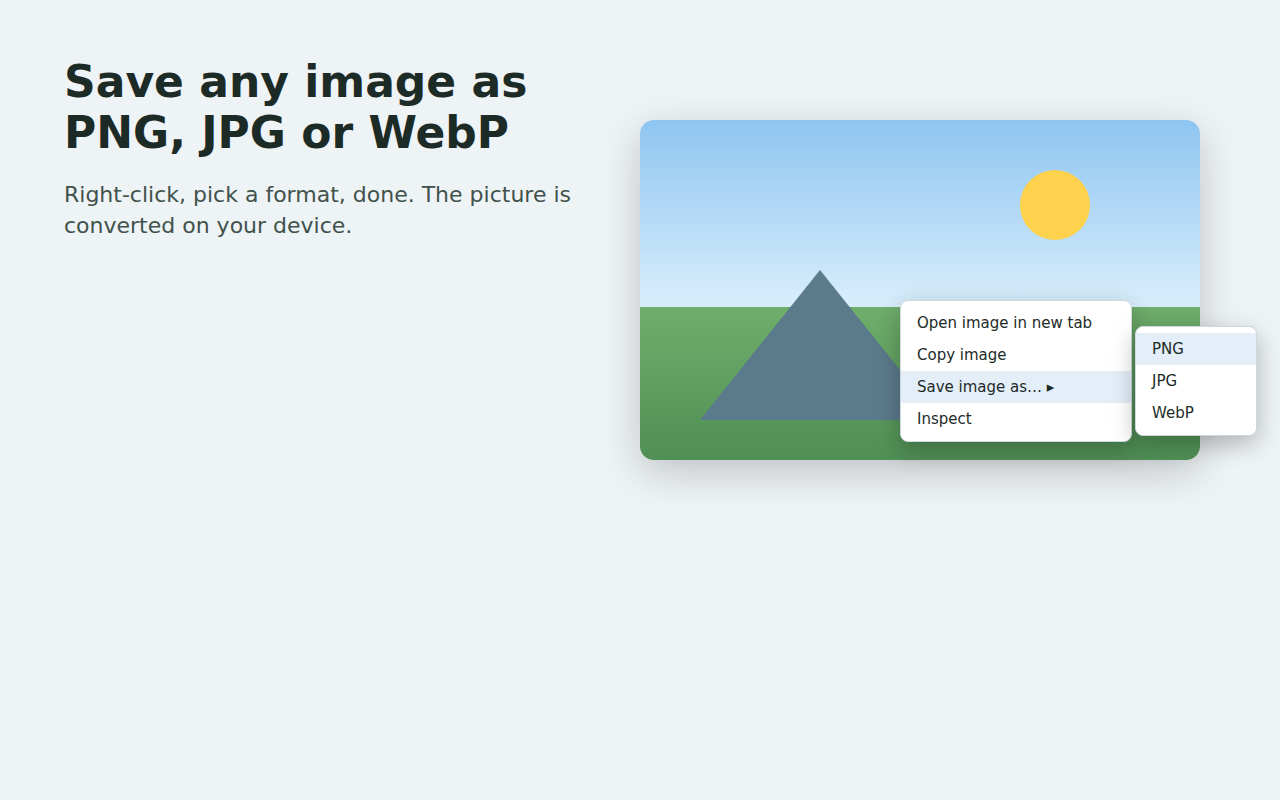
- It converts the image file the page loaded, at its full size. It is not a screenshot.
- The conversion runs in a hidden page of the extension, on your device. Nothing is uploaded.
- PNG keeps the pixels exactly as decoded, with no further loss. JPG compresses again; the free version saves at 92% quality. Transparent areas turn white in a JPG, because JPG has no transparency.
- Animated images are saved as a single still frame.
- Some sites do not let other pages read their images. For those, Chrome asks once for site access, at the moment you save. You can say no.
What we tested
| Source image | Saved as | Result |
|---|---|---|
| AVIF, 600 x 300 | PNG | A real PNG, 600 x 300 |
| AVIF, 600 x 300 | JPG | A real JPG, 600 x 300 |
| WebP, 600 x 300 | PNG | A real PNG, 600 x 300 |
| WebP, 600 x 300 | JPG | A real JPG, 600 x 300 |
| An address ending in .jpg that sent AVIF | JPG | A real JPG, named picture.jpg |
Image Type Saver 1.0.0 and 1.0.2 in Chrome for Testing 148, images served from a local test server, October 30, 2026. Each saved file was checked by its file signature and pixel size.
Get it
Image Type Saver is free for single images. Pro ($6 once) saves every image on a page and lets you set quality, a maximum width and file names. It asks for no site access when you install it, and has no accounts, analytics or ads. Get it from the Chrome Web Store.
Sources
- r/browsers, "Why is almost EVERY image online a bloody WEBP or AVIF file? Editing programs hate them. What was wrong with JPG?!", February 26, 2026: reddit.com/r/browsers/comments/1rf6o2j
- Google for Developers, "An image format for the Web" (WebP): developers.google.com/speed/webp
- Cloudflare docs, "Polish compression": developers.cloudflare.com/images/polish/compression
- Cloudflare docs, Images features,
formatoption: developers.cloudflare.com/images/optimization/features - Accept header and conversion tests: measured by 1088 Labs, October 30, 2026 (AVIF test files made with ffmpeg and libaom).